
Some games reverse the axis output relative to the global settings so you may need to reverse them.
Firstly, go to the axis settings to alter them.

1. To reverse a single axis simply click on the arrows.
2. for the e2 or e3, it’s a bit more complicated. There are rules to follow, see below.
3. Click on B or C Axis Assignments if necessary.
4. Press save.
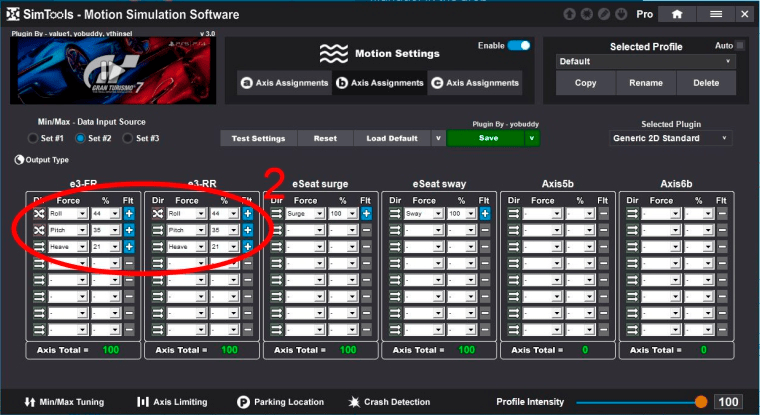
The rules to follow to alter roll, pitch or heave directions are as follows.
e2
Roll – e3-FL direction in A axis assignments should be the opposite of e3-FR in B axis assignments.
Pitch – e2-FL direction in A axis assignments should be the same as e3-FR in B axis assignments.
Heave – e2-FL direction in A axis assignments should be the same as e3-FR in B axis assignments.
e3 – As above plus:
Roll – e3 FL and RL in A axis assignments should be the same. e3-RL direction in A axis assignments should be the opposite of e3-RR in B axis assignments.
Pitch – e3 FL and RL in A axis assignments should be opposite. e2-RL direction in A axis assignments should be the same as e3-RR in B axis assignments.
Heave – all axes should be the same